

The Self-Improving Loop: a 300-agent swarm on Kimi K2.6, verified by Opus 4.8

A free open-source model is running 300 parallel agents across 4,000 coordinated steps from a single prompt, and it scores higher on real research tasks than models you pay 5x more for.
Most people have never opened it.
They open Kimi, type a question, get an answer, close the tab. That's the chatbox. It works. It's also about 10% of what the product does.
Here's the part most people skip:
The swarm doesn't just run fast. Run it right and it leaves something behind every time - a reusable skill, a sharper spec, a constraint that stops the next run from repeating today's mistake.
The swarm that ran your task yesterday should be smarter than the one running it today.
That's the loop. Kimi does the work and the learning. Opus 4.8 sits at one gate - the verify gate - and its only job is to stop garbage from getting saved as a skill. The engine learns. The closer keeps it honest.
Some people pick one model and marry it. Some chase the top benchmark line. Others wire up LangGraph and spend a weekend debugging a DAG.
The result is usually the same: a workflow that does the exact same thing on run #50 as it did on run #1.
This is not that. This is the complete playbook for a swarm that compounds. 10 steps. Every prompt is copy-paste. Every number is verified.
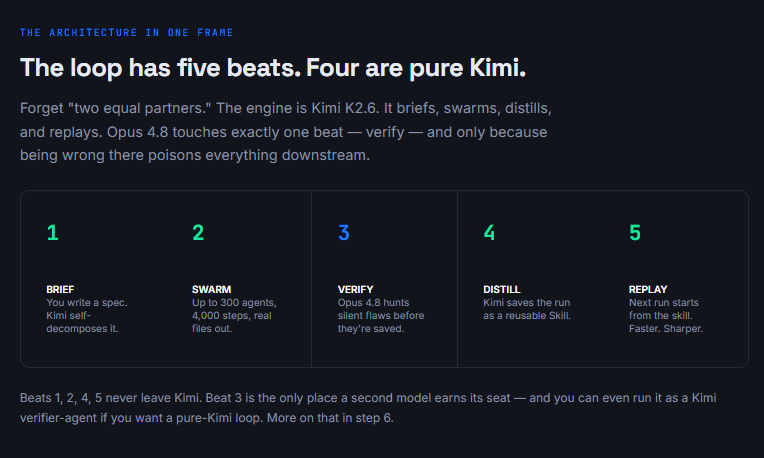
Part 1 - Build the loop once. Run it forever.
01. Write a spec, not a prompt
When most people hear "300 agents" they fire off a one-liner -"research the fitness app market" - and expect brilliance. That's the fastest way to burn credits and get junk.
A one-line prompt gives the swarm permission to decide everything, and it will decide wrong.
Treat the swarm like a contractor, not a genie. A spec defines what to collect, what counts as valid, which sources are allowed, the exact output format, and what to do on conflict. Here's the part most people skip: Kimi decides the decomposition itself.
You don't build the agents like you would in CrewAI, you don't wire the graph like LangGraph, you don't define structure like AutoGen. You describe the goal - the swarm builds the org chart.
The spec is the single highest-leverage artifact in the whole loop, because in step 4 it becomes the seed of your reusable skill.

02. Read the decomposition plan before you spend a cent
This is the step first-timers skip, and it's the most expensive one to skip.
After you submit the spec, Kimi shows you the execution plan before it runs - how many sub-agents, what each handles, the dependency order, the step budget.
Read it. A 200-agent swarm decomposed wrong costs real money and real hours. Checking the plan costs nothing. You're looking for three things: does it understand the scope, is the agent count sane for the task size, and does the output plan match what you actually need.
One detail worth knowing: the 4,000 steps is a total coordinated budget across the swarm, not 4,000 steps per agent. A 300-agent run averages ~13 steps each - short, specialized subtasks. That tells you whether your task fits the shape.

A one-line prompt is a wish. A spec is an order. The swarm executes orders.
03. Let it be wasteful - that's the point
Now you run it. Up to 300 sub-agents fire in parallel waves. The first wave handles fully independent subtasks.
As results land, the orchestrator launches the next wave on whatever depended on them, until the dependency graph resolves.
Each sub-agent works in its own bounded context window. That's the structural trick: a single agent on a long task fills its window until it drowns and starts lossy summarization, and every reasoning step after that gets worse.
The swarm gives each subtask its own scoped context, so only structured output flows back to the coordinator. That's why it doesn't collapse on tasks that break a single agent.
Because Kimi runs at $0.95/M in and $4.00/M out - with cache hits at $0.16 - you can afford to throw the first attempt away and run it again. Cheap volume changes what you're willing to attempt.

04. Demand real files, not a chat answer
The output of a swarm is not text in a window. It's structured deliverables that go straight into your work - and this is the part most articles miss.
One run lands PDFs, spreadsheets, datasets, slide decks, and working code, all from a single launch, because Kimi emits those formats natively.
So lead the spec with the output, always.
"A comprehensive report" gives agents permission to stop early. "A 40-page PDF + one CSV with 20,000 rows + 14 export-ready PNG charts" gives them a quality target to hit.
Specificity at the output level is the difference.

05. Point the honest model at the output and ask what's wrong
Here's the one beat that isn't Kimi. The swarm's known flaw: unless you explicitly demand verification, it produces confident, under-cited claims, and independent sub-agents sometimes contradict each other. "Looks done" and "is correct" are different planets.
Opus 4.8 is built for exactly this gate. Anthropic reports it's roughly 4x less likely than 4.7 to let a flaw in its own code pass unremarked, and it's the first Claude to score 0% on uncritically reporting flawed results.
Its only job here is to refute, not to praise. You're not paying premium tokens to generate - you're paying them to catch the silent flaw before step 4 saves it into a skill forever.

Cheap volume is only a superpower when something trustworthy is checking the work. Keep the verify gate.
06. Save the whole workflow as a Skill
This is the beat that makes the loop self-improving. After a run you'll repeat, tell Kimi to capture the entire workflow as a reusable Skill - input format, agent steps, output format.
The first run takes 20 minutes. Every run after it takes 30 seconds.
That's the honest version of "self-learning." The model isn't retraining its weights between your runs.
The system around it is getting smarter - your skill library grows with every project, and every future swarm applies those skills automatically.
A competitor can't copy that library in a week. It's built from months of your real runs.
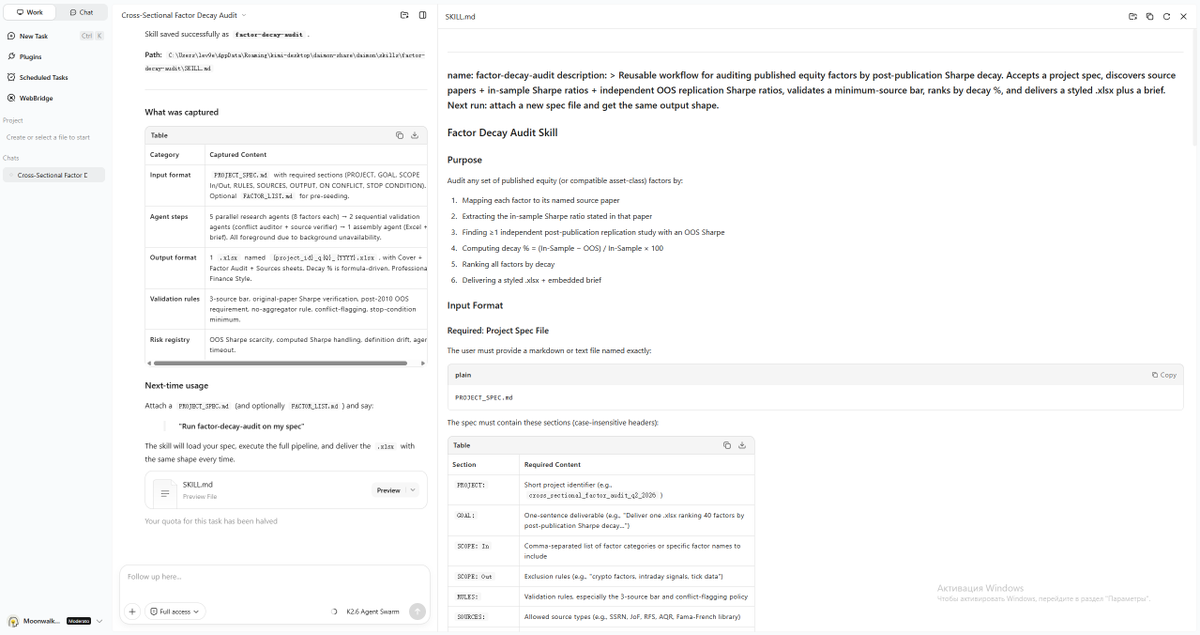
07. Feed your own documents in as swarm knowledge
Skills capture process. Document-to-Skill captures domain. Upload your best work - a closed-deal proposal, a polished report, a deck - and Kimi captures its structural and stylistic fingerprint as a skill every future swarm applies automatically.
Here's where it compounds: every PDF, transcript, or spreadsheet you feed in becomes context that all 300 parallel agents can ground against, instead of falling back on general training data.
The more you feed it, the more accurate every subsequent run becomes. Reports stop reading like generic AI and start reading like your work.
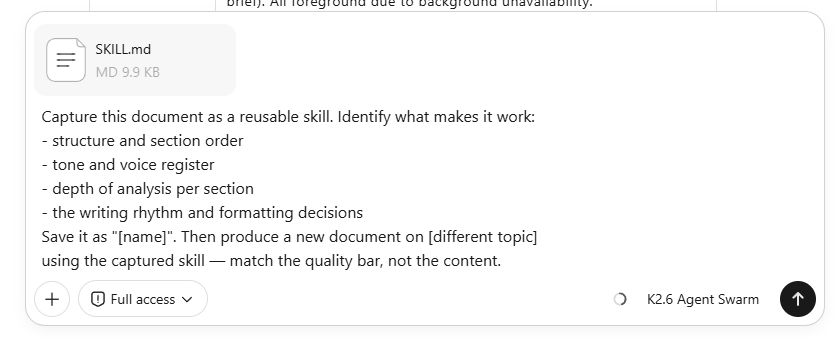
08. Turn the verify feedback into a permanent rule
Step 5 catches a flaw once. Step 8 makes sure the swarm never makes it again. Take Opus's fix list and don't just patch the output - bake the lesson into a project-level constraints file Kimi reads automatically at the start of every session.
This is the loop learning from its own failures. The drift that Opus flagged on run #1 becomes a hard rule on run #2.
Over a few projects, your constraints file turns into living documentation that enforces itself - and the verify gate has less and less to catch each time.
09. Replay the skill on new inputs - watch the cost collapse
Now the payoff. Run #2 doesn't start from zero. It starts from the skill, the swarm knowledge, and the constraints file you built in steps 6–8.
Same workflow, new files, a fraction of the setup.
This is where "compounding" stops being a buzzword and shows up on the invoice. The first competitive-monitoring run takes a full spec and a verify pass.
The fourth one is a 30-second prompt against the saved skill, and the output is sharper because it inherits every fix from the runs before it.

20 minutes on run one. 30 seconds on run fifty. That gap is the whole reason to build a loop instead of a prompt.
10. Promote the loop to a background agent
The final move: once a loop is stable and skill-backed, you stop launching it by hand.
Point Kimi at the trigger - a schedule, a new file drop, a competitor's pricing page - and let it run the whole loop proactively, surfacing only the deliverable and the deviations.
Competitive monitoring is the clean example.
Run #1 you build and verify by hand. By the time it's a background agent, it's checking every competitor in parallel weekly and dropping a brief in your inbox at zero marginal time cost.
The only human left in the loop is the question you set and the decision you make on the answer.
Conclusion:
While the closed labs keep shipping one smarter chatbot at a time, an open model is running 300 agents in parallel - and getting smarter at the system level with every run you give it.
We've seen this exact fingerprint once already. An open release reframes what the closed frontier thought it owned, and the whole field recalibrates overnight. It happened with DeepSeek.
A self-learning swarm on an open-weight model has the same shape.
The builders still arguing about which model "won" are answering a question that stopped mattering.
The question now isn't which model is smartest. It's how many you can run at once, who's checking their work, and whether your setup is sharper today than it was yesterday.
Most people will read this and keep using Kimi as a chatbox. A few will build the loop this week. The first run takes 20 minutes. Every run after that is leverage you own.
Build it. Verify it. Distill it. Then watch it get cheaper and sharper every single time you run it.