@_avichawla
Can't believe how many kitchens I've been in and theres been these in there 😂😂😂😂
Ventriloquist Nina Conti does a human ventriloquism bit with two sisters from the audience.
Sending bitcoin via Ark to a Kenyan phone number. They receive Kenyan shillings via M-PESA. Instant. 0% routing fees. Powered by @tando_me 52 million Kenyans are now reachable on Ark. Network effect grows circular economy. Built at @btcplusplus Nairobi 🇰🇪🦒
Here are the two worst questions to ask on sales presentations: 1. “Does that make sense?” 2. “What questions do you have?” They offer no value (aside from getting you to shut up for a second). 10 questions that sell to ask instead:
It’s some place that Manchester 😂😂😂
Hermes Agent FULL GUIDE: Architecture, Setup, and the Self-Improving Loop
🚨 Listen very carefully to what Tony Blair and Larry Ellison of Oracle are telling you. Everything about you will be centralised as data, run by AI, from your genome to your behaviour. You will be watched & monitored constantly. The Panopticon is being built without consent. And when it’s built they won’t need to bother asking you anything anymore. Why do you really think they need those data centres 🚨
VIVANTに出てくる「AIハヤト」みたいな世界観を作りたくなって、世界中の公開データ(OSINT)だけで組んだ監視ダッシュボードを大幅にグレードアップしました。 HAMASCOPE/全世界監視 https://hamasakitakehiro.com/hamascope/ 特別な情報は何ひとつ使っていません。誰でも見られる公開データだけで、作戦室の大画面みたいなものが本当に動きます。 ■ 世界242地点のライブカメラ 日本75地点+海外167地点。ダナン、バリ、プーケット、サントリーニ、アイスランドのオーロラまで。 リストに無い街でも、地名を入れると「今まさに生中継しているカメラ」を世界中から探してきます。 9つの街を同時に映す監視ウォールと、40秒ごとに世界を旅する自動巡回つき。 ■ 頭上を飛ぶ衛星が全部見える 国際宇宙ステーション、カーナビのGPS衛星、スターリンクなど約1,500機。 本物の軌道データをもとに、いまどこを飛んでいるかを1秒ごとに計算して表示しています。 「ISS追尾」を押すと、カメラが宇宙ステーションを追いかけ続けます。 ■ ほかも全部リアルタイム ・いま空を…
❤️🔥 Claude Fable 5 is so back! Just Recorded a 16 min Tutorial on How to use Claude Fable 5 to Build Cinematic $50k Websites (step-by-step) Anyone can now build stunning sites fully with AI
btw once you have all these security in place this is what it unlocks: https://x.com/elvissun/status/2025920521871716562?s=20
1B/ Izmir surroundings. The smart move. My personal preference: live near the major city, not in it. Cascais to Lisbon. Here's the Izmir version. Urla, ~40 min west. Vineyards (the Urla Wine Route is real), strong food scene, growing creative and expat community. Coastal villages within reach. The closest Cascais-equivalent on this list. Foça, ~1h north. Ancient Phocaea, historic harbor town, fishing-village rhythm. More traditional than Urla. Seferihisar, ~45 min south. Turkey's first Cittaslow (slow city) member. Includes the cobblestone harbor village of Sığacık. (Çeşme and Alaçatı handled separately at pick 4.) All within an hour of Izmir's airport, schools, and healthcare. Small-town life with big-city access.
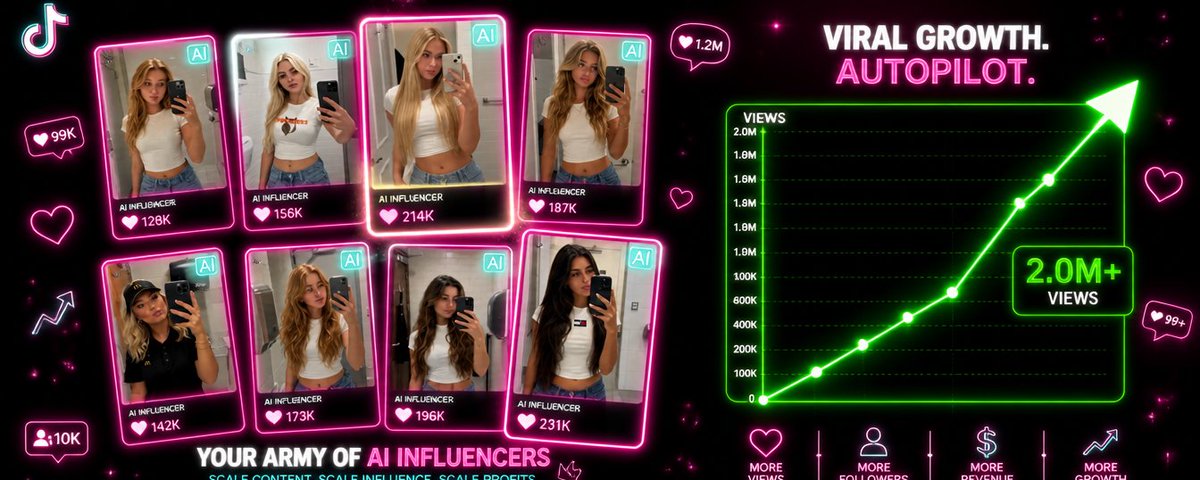
How You Can Build Your Own Army of AI Influencers to Promote Your App
LEARN HOW TO CREATE PROFESSIONAL WEBSITES USING GEMINI 3.1 + SEEDANCE 2.0 IN JUST 15 MINUTES
Enzo bumping into Rosenior at Cobham
You used to have your bet ideas in the shower, now you have a waterproof speaker. You used to get lost in thought waiting for the train, now you have a phone to fill the gap. You used to daydream on long flights, now there's a screen in your hand and on the seat in front of you. You used to think on your morning commute, now you have a podcast playing before you leave the house. We used to stare in to the sky or into a fire and let our minds drift, now we have TVs and phone to replace that. We filled every silence and lost all of our peace, creativity and ideas that lived within that silence.
-uni is draining -staying home is boring -going out is tiring Idk wtf I like anymore
Wrote a little more about this: https://www.adamhjk.com/blog/you-still-have-to-refactor-even-with-ai/
claude code üzerinden codex kullanmanız için bunu kullanın claude mcp add --scope user --transport stdio codex -- codex mcp-server kaydedin kullanın faydasını görürsünüz
check out the updated skill-creator. i esp like built-in support for test generation (e.g., to measure + optimize tricky things like skill trigger rate). available in Claude Code as plugin,, + Cowork.
We finally know the culprit behind the collapse of Terra now.
Claude Cowork now supports the Slack MCP on all paid plans! The Slack connector is by far my favorite feature. I use it every morning to catch up on what I missed, highlight important messages, and draft replies for me to review before sending. Huge time saver.
Claude Opus 4.6 just became the most dangerous competitive intelligence tool on Earth. I reverse-engineered my competitor's entire strategy in minutes. Found their pricing, positioning, weaknesses, and future roadmap. Here's the prompt (use responsibly): --- "Conduct deep competitive intelligence on [COMPETITOR NAME]: COMPANY OVERVIEW: - Founding story and key milestones - Leadership team (backgrounds, previous companies) - Funding history (rounds, investors, valuations, burn rate estimates) - Employee count and growth trajectory (check LinkedIn headcount) - Office locations and expansion patterns PRODUCT DEEP-DIVE: - Complete product catalog with descriptions - Pricing tiers (current + historical changes) - Feature comparison vs top 3 alternatives - Technology stack (from job postings, tech blogs, BuiltWith) - Recent product launches (last 12 months) - Roadmap clues (from: job postings, conference talks, patent filings, customer surveys) MARKET POSITIONING: - Target customer (size, industry, characteristics, job titles) - Ideal Customer Profile (ICP) based on case studies - Messaging and positioning (analyze website, ads, content) - Brand voice and personality - Key differentiators they claim GO-TO-MARKET STRATEGY: - Marketing channels (paid, organic, partnerships) - Content strategy (blog topics, frequency, engagement) - Sales approach (inbound vs outbound, PLG vs sales-led) - Partnership ecosystem (integrations, resellers, tech partners) - Event presence (conferences, webinars, sponsorships) CUSTOMER INTELLIGENCE: - Review analysis (G2, Capterra, TrustPilot - what do users love/hate?) - Common complaints (from Reddit, Twitter, support forums) - Feature requests and gaps (from public roadmap, user forums) - Churn signals (Glassdoor reviews, customer testimonials that stopped) STRATEGIC VULNERABILITIES: - What are they bad at? (based on reviews, hiring patterns) - What markets are they ignoring? - Where are they overextended? - Technology debt or legacy…
JESUS CHRIST ON BBC NEWS
Democrat Rep. LaMonica Mclver says that she has “sleepless nights” because of the possibility of spending 17 years behind bars for assaulting law enforcement officers at an ICE facility. FAFO
Commencing countdown, engines on 🚀 Migration from $GOVAI to $MOCK 25th Sep '25
@apeondip CHASE OPPORTUNITIES 👏 LIKE $GOVAI MIGRATING TO $MOCK LIFE CHANGING 1000X 🚀
Welcome @govaionsol who will be an initial platform launch partner during our first migration wave! We are excited to set a new standard for migrations with your community and participation 🔄
I'm Boris and I created Claude Code. I wanted to quickly share a few tips for using Claude Code, sourced directly from the Claude Code team. The way the team uses Claude is different than how I use it. Remember: there is no one right way to use Claude Code -- everyones' setup is different. You should experiment to see what works for you!
A few random notes from claude coding quite a bit last few weeks. Coding workflow. Given the latest lift in LLM coding capability, like many others I rapidly went from about 80% manual+autocomplete coding and 20% agents in November to 80% agent coding and 20% edits+touchups in December. i.e. I really am mostly programming in English now, a bit sheepishly telling the LLM what code to write... in words. It hurts the ego a bit but the power to operate over software in large "code actions" is just too net useful, especially once you adapt to it, configure it, learn to use it, and wrap your head around what it can and cannot do. This is easily the biggest change to my basic coding workflow in ~2 decades of programming and it happened over the course of a few weeks. I'd expect something similar to be happening to well into double digit percent of engineers out there, while the awareness of it in the general population feels well into low single digit percent. IDEs/agent swarms/fallability. Both the "no need for IDE anymore" hype and the "agent swarm" hype is imo too much for right now. The models definitely still make mistakes and if you have any code you actually care about I would watch them like a hawk, in a nice large IDE on the side. The mistakes have changed a lot - they are not simple syntax errors anymore, they are subtle conceptual errors that a slightly sloppy, hasty junior dev might do. The most common category is that the models make wrong assumptions on your behalf and just run along with them without checking. They also don't manage their confusion, they don't seek clarifications, they don't surface inconsistencies, they don't present tradeoffs, they don't push back when they should, and they are still a little too sycophantic. Things get better in plan mode, but there is some need for a lightweight inline plan mode. They also really like to overcomplicate code and APIs, they bloat abstractions, they don't clean up dead code after themselves, etc. They wi…
Teenager Christopher Slayton built the "entire known universe" in Minecraft. [🎞️ ChrisDaCow]
Avi Chawla