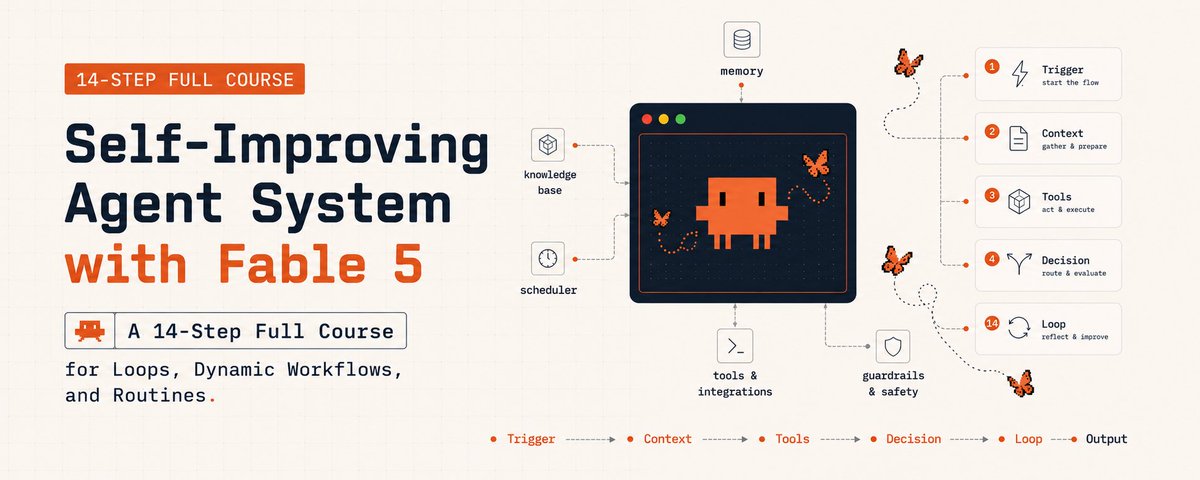

Loop engineering: the 14-step roadmap from prompter to loop designer.

Most developers still prompt their coding agents by hand. They type, they wait, they read the diff, they type again. 9out of 10 builders have never written a single loop that prompts the agent for them.
No automation, no state file, no verifier, no schedule. The leverage point has moved - from typing prompts to designing systems that prompt. This is the 14-step roadmap from prompter to loop designer.
Follow my Linkedin to get fresh AI alpha: linkedin.com/in/lev-deviatkin
This is the 14-step roadmap to make that shift - sourced from Anthropic’s engineering docs, Addy Osmani’s long-form on loop engineering, and recent measurement studies.
Three tiers: figure out if you actually need a loop, learn the five building blocks, then build the smallest one that works without hurting you.
14 steps. 3 tiers. Stop prompting. Start designing.
PART 1 · The Why & The Test
01. Loop engineering is replacing yourself as the prompter.
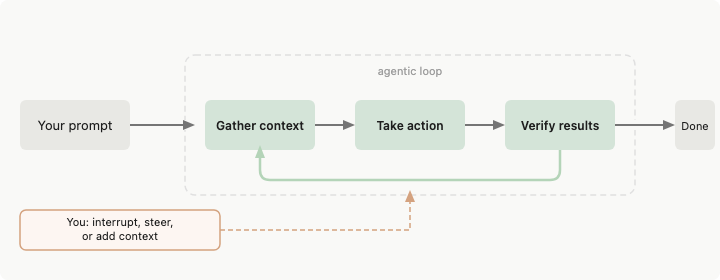
For two years, the way you got something out of a coding agent was: write a prompt, share the context, read what came back, write the next prompt. The agent was a tool and you held it the entire time. That part is ending.
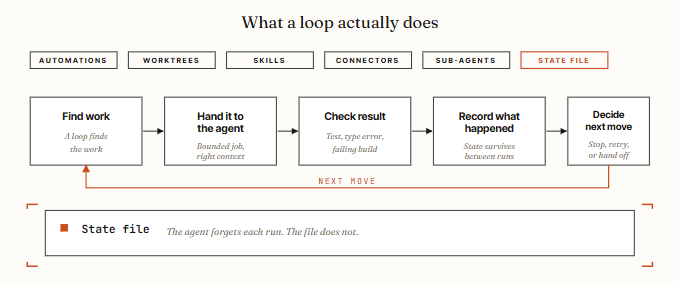
Loop engineering is building a small system that finds the work, hands it to the agent, checks the result, records what happened, and decides the next move - on its own. You design that system once. The system prompts the agent from then on.
Addy Osmani breaks it into six parts:

Anthropic engineers now merge eight times as much code per day as they did in 2024 - a figure Anthropic itself calls “almost certainly an overstatement of the true productivity gain.”
The number is debated. The mechanism isn’t: the leverage point moved from typing prompts to designing the loop that prompts.
02. Run the 4-condition test before you build anything.
Loops earn their cost under four conditions. Miss one and the loop costs more than it returns. The honest take from AlphaSignal’s analysis, and the part most X-threads skip:
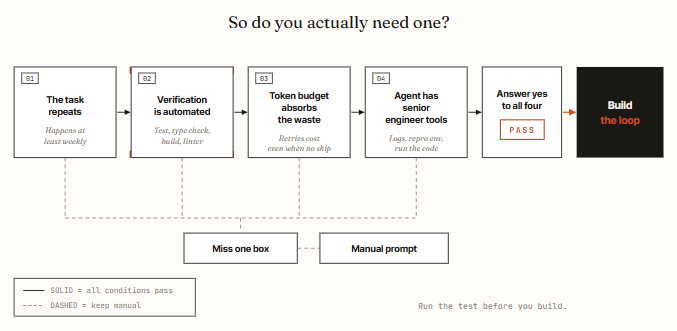
The four conditions in plain English:
03. Who wins, who loses. Loops favor whoever can spend.
The economics are not universal. The people calling loop engineering obvious tend to have unmetered tokens.
The people for whom it’s reckless are usually on a $20 consumer plan trying to run heavy verification loops without hitting limits or a surprise invoice.
Who actually benefits, in practice:
Who should skip it, today:
For one-off tasks, exploratory work, or anything where “done” is a judgment call, a single well-aimed prompt still wins. The honest version of this article is: loop engineering is real, and most developers don’t need it yet.
04. The 30-second loop check.
The 4-condition test from step 2 is the strategic decision. This is the tactical one - the checklist you run on a specific task before you turn it into a loop.
Miss one box and keep it as a manual prompt.
Good first loops:
Bad first loops - these need a human in the chair:
PART 2 · The 5 Building Blocks
05. Automations: the heartbeat.
Automations are what make a loop an actual loop and not just one run you did once. They fire on a schedule, on an event, or on a trigger condition. They’re the heartbeat - everything else in the loop hangs off them.
What this looks like in the two tools that matter:
Two primitives inside an automation that separate working loops from expensive ones:

This is the maker-vs-checker split applied to the stop condition itself.
06. Worktrees: parallel without chaos.
The second you run more than one agent, the files start colliding. Two agents writing the same file is the same headache as two engineers committing to the same lines without talking first.
A git worktree fixes it - a separate working directory on its own branch sharing the same repo history, so one agent’s edits literally cannot touch the other’s checkout.
How it shows up in both tools:
Worktrees take away the mechanical collision, but you are still the ceiling. Your review bandwidth decides how many parallel agents you can actually run - not the tool.
07. Skills: write project knowledge once. Read on every run.
A Skill is how you stop re-explaining the same project context every session like a goldfish. Both tools use the same format: a folder with a SKILL.md inside, holding instructions and metadata, plus optional scripts, references, and assets.
Why this matters specifically for loops: a loop without skills re-derives your whole project context from zero every cycle. With skills, intent compounds.
The conventions, build steps, “we don’t do it like this because of that one incident” - written once on the outside, read by every run.
08. Connectors: the loop touches your real tools. Via MCP.
A loop that can only see the filesystem is a tiny loop. Connectors, built on the Model Context Protocol (MCP), let the agent read your issue tracker, query a database, hit a staging API, drop a message in Slack.

Codex and Claude Code both speak MCP, so the connector you wrote for one usually just works in the other.
This is the difference between an agent that says “here is the fix” and a loop that opens the PR, links the Linear ticket, and pings the channel once CI is green.
The connectors are the reason the loop can act inside your actual environment, not just tell you what it would do if it could.
The connectors that pay back fastest for loop work, in order:
09. Sub-agents: keep the maker away from the checker.
The most useful structural thing in a loop, by far, is splitting the agent that writes from the agent that checks.
Osmani’s framing is exact: the model that wrote the code is “way too nice grading its own homework.” A second agent with different instructions and sometimes a different model catches the stuff the first one talked itself into.
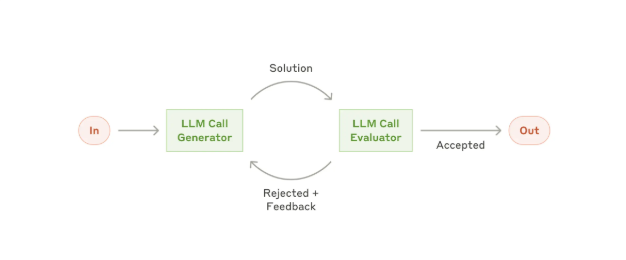
This is the evaluator-optimizer pattern from Anthropic’s December 2024 engineering post under a new name. One model generates, another critiques, repeat. The vocabulary going viral in 2026 was documented eighteen months ago.
How sub-agents land in both tools:
The reason it matters specifically inside a loop: the loop runs while you are not watching, so a verifier you actually trust is the only reason you can walk away.
Sub-agents burn more tokens since each one does its own model and tool work - spend them where a second opinion is worth paying for.
PART 3 · Build It Right or Don’t Build It
10. The state file. The agent forgets. The file does not.
This is the piece that sounds too dumb to matter and is actually the spine of every working loop. A markdown file, a Linear board, a JSON state -anything that lives outside the single conversation and holds what’s done and what is next.
Why this matters: agents have short memory by default. What they learn this session is gone tomorrow unless you write it down.
Osmani’s rule: the agent forgets, the repo does not. A loop without persistent state restarts every run; a loop with state resumes.
Two patterns for where the state file lives:
For long-running loops that risk drifting off the goal, pair the state file with a standing high-level spec - VISION.md or AGENTS.md - that the agent rereads each run. State tells the agent where it is. The spec tells it where to go.
11. The minimum viable loop.
If you passed the 4-condition test in step 2, build the smallest loop that works before anything fancy. Four parts, no swarm.
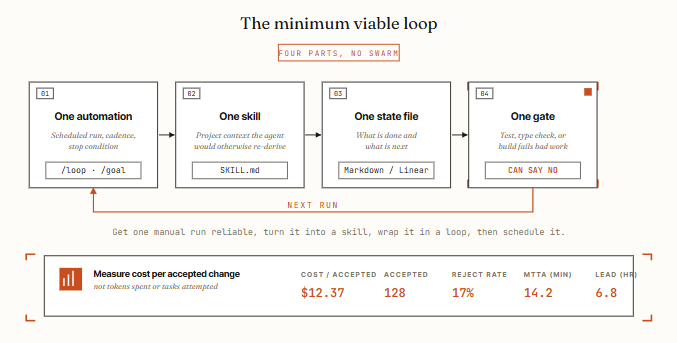
The four parts, in plain language:
Order matters: get one manual run reliable first. Turn it into a skill. Wrap it in a loop. Then schedule it. Skipping ahead is how loops fail in production.
The metric that matters is cost per accepted change - not tokens spent, not tasks attempted, not loops scheduled. If your accepted-change rate is below 50% you’re doing review work the loop saved you from, and the loop is losing.
12. The Ralph Wiggum loop. Loops that fail quietly.
Engineer Geoffrey Huntley documented this failure mode and named it. An agent meant to emit a completion token only when finished emits it early, and the loop exits on a half-done job. Without a hard gate, loops fail quietly and keep spending.

The Ralph Wiggum loop is what happens when:
The fix is the gate from step 11 - something objective that can fail the work. A test that passes or fails. A build that compiles or doesn’t. A linter that returns zero or non-zero. Not a verifier that has an opinion.
Other measured failure modes worth knowing:
13. Comprehension debt and cognitive surrender.
This is the failure mode that gets sharper as the loop gets better, not worse. Two named risks, both from Osmani’s essay:
The mitigations are not technical:
14. The security tax. An unattended loop is an unattended attack surface.
A loop running unattended is also an attack surface running unattended.
The threat model your loop has to defend against:
§ The mistakes that turn loops into money pits
Conclusion:
The leverage moved. Your job did too.
For two years, the leverage in working with coding agents was at the prompt. Better prompts, better context, better one-shot output.
That phase is ending. The agents got good enough that the next leverage point is one floor up: the system that decides what they work on, when, with what gate, and what state survives between runs.
But the honest version of this story is not that everyone should rush to build loops. Most developers don’t need one yet - not until the task repeats, verification is automated, the budget can absorb the waste, and the agent has senior engineer tools.
Miss one condition and the loop costs more than it returns.
If you pass the test, build small. One automation. One skill. One state file. One gate. Get a manual run reliable. Turn it into a skill. Wrap it in a loop. Then schedule it. Order matters. Skip ahead and you’re paying for a system no one understands.
Cherny’s point isn’t that the work got easier. It’s that the leverage point moved. Build the loop. Stay the engineer.