Loading post
Loading @aiedge_'s post
@aiedge_
🚨 Stop telling AI: “Create me a logo.” That’s how you get generic, forgettable designs. Instead, use this 7-step prompt system to make AI think like a professional brand designer. Save this thread before your next logo project. 🧵👇
Every Agentic Engineering Hack I Know (June 2026)
the last one ate thooo
今こいつの日本語強化+無検閲化したやつを頑張ってグラボ燃やしながら作ってるから待っててね
Agent capabilities in just 4B parameters, with native 1M context. Don’t miss Spark-X2.5-4B. Apache 2.0. 🤖 https://modelscope.ai/collections/XHToken/Spark-X25 🏆 Beats Qwen3.5-9B on SWE-bench Pro (44.4 vs. 33.8) and SWE-bench Multilingual (53.3 vs. 43.3). 🛠️ Leads the comparison on τ³-bench, MCP-Atlas, MCP-Mark, Workspace Bench, VitaBench 2.0, and BrowseComp. 💻 Fix repositories, write code, call tools, and work inside Codex, Claude Code, OpenClaw, and Hermes. 🧮 Scores 90.7 on AIME 2026 and 8…
Claude Artifacts can now call your MCP connectors so shared dashboards pull fresh data through each viewer's own connections with no refresh job, no shared credentials and nothing to maintain.
THE NEW HBO’s HARRY POTTER TRAILER IS HERE Releasing this Christmas on HBO
Google Pics is here. Upload your own videos or connect to Google Photos and make edits with Nano Banana. Google Pics breaks your image into specific layers so you can adjust individually all in one place. Here's a quick look:
名古屋育ちワイ、親の顔より見たナディアパークがエロゲの聖地になっている事を今知る
feel like i was intruding
make money with grok bot in 6 weeks (FULL GUIDE)
天崩地裂一般,跑根本来不及,伤亡估计很大啊
I knew this wouldn’t end well. I feel sorry for everyone who bought VCX based on the hype and is now down 80% in 3 days. Big lesson right there.
127 places to get backlinks for startup: 1. Chrome Web Store (DR 99) 2. Forbes (DR 94) 3. TrustMRR (DR 69) 4. GitHub Pages (DR 97) 5. TrustRadius (DR 84) 6. AlternativeTo (DR 79) 7. Product Hunt (DR 91) 8. Substack (DR 94) 9. Uneed (DR 75) 10. Indie Page (DR 66) 11. Privacy Tools (DR 73) 12. SourceForge (DR 92) 13. SEO Wins (DR 32) 14. TinyLaunch (DR 72) 15. OSS Gallery (DR 31) 16. BetaList (DR 76) 17. Alternative Me (DR 75) 18. SaaSHub (DR 79) 19. Medium (DR 94) 20. Indie Hackers (DR 81) 21. H…
Holy Crap - Famous Worldwide British Singer James Blunt & Hollywood Star Hayden Panettiere means not only don’t they hide it anymore - they actively want you to see it. Sacrifice.
Jessica Cook is an award winning Artist - here she is in Brooklyn, JYC, presenting her latest piece of ‘Art’. Yes just like everything else - the World of Art is being decimated too.
There Are Only 4 Ways to Make Money. Everything Else Is a Story.
Me realising I can run these models locally on my M1 MacBook Air for free
Alibaba releases an open source framework that's like OpenClaw + Claude Cowork. Self hosted, persistent memory, skills, & more!
How I Run the Pi Coding Agent on Cloudflare
The Quant Research Pipeline Nobody Explains.
Every 6 and 7 figure deal I've ever closed followed the same two-meeting structure. Meeting 1: I walk in and I don't pitch. Not a single word about what I'm selling. First thing I do is set the frame. "Here's how this works. I'm going to spend 20 minutes understanding your situation. At the end of that, if I think there's something worth discussing, I'll tell you what it is. If there isn't, I'll tell you that too. Either way you'll get something useful from this conversation." That's it. Now I start the fact-find. But I'm not asking questions. I'm making assumptions. "I'm assuming you're already doing X." "I'm guessing you've got Y in place." If they confirm, I move forward. If they don't, I've just found a gap. Every correction they make is ammunition. By the end of the fact-find I've got 3 or 4 gaps sitting in front of me. Then I expose them. "So from what you've told me, you're currently in X situation. You've got Y gap. And because of that, Z is happening." Pause. "Is that a position you're comfortable being in?" They say no. Now I present the solution. Not a deck or a 40-minute walkthrough. Two minutes for: - The problem they just admitted. - The solution that closes it. - Why it works. Then before I leave the room: "Before I send you anything, if this is exactly as I've described it, would you do it?" If they say yes, I book Meeting 2 and send the details. If they hedge, I don't send a thing. "Then there's no point me sending you details right now. Let's reconnect when the timing is right." That exit alone makes them want it more. Meeting 2: This is not a re-pitch. The decision was made in Meeting 1. Meeting 2 is due diligence. They've read the details. They have specific questions about the mechanics. I handle those live. Any final objections surface here. I handle those live too. Then I ask for the signature. "Right. Based on everything we've discussed, the next step is getting the paperwork signed. Does Tuesday work…
A billionaire trader has spent 40 years trying to delete a one-hour documentary. It shows him making $100 million in a single afternoon. He predicted the crash that made it possible three months in advance. He has never explained why he wants the film gone. His name is Paul Tudor Jones. The film is on YouTube. The documentary is called "Trader." PBS filmed it in 1987, three months before Black Monday. Jones was 32 years old, working from a small New York office, wearing shorts and a t-shirt, yelling at his phones, throwing paper across the room, and sleeping under his desk. The film captures him and his research partner Peter Borish overlaying a chart of the 1929 market on 1987, month by month. The two charts tracked within one percent. Borish said this is exactly what happened in 1929. Jones said if the analog holds, October is when it breaks. On October 19, 1987, the Dow fell 22.6 percent in a single day. It remains the largest one-day percentage loss in stock market history. That afternoon, Tudor Jones covered his shorts and made roughly $100 million. He was 33 years old. He was one of the very few traders on the street who came out ahead. He tried to bury the tape because it made him look reckless in a professional world that punished swagger. Twenty years of legal effort did not delete it. Someone kept a copy. It is on YouTube. It has fewer views than most makeup tutorials. The film is not really about a crash. It is about a specific philosophy of trading. Jones is shown building conviction slowly, sizing carefully, then striking hard when the setup arrives. He is never once shown making a random bet. He is shown doing the same thing five times a day, every day, for three months. His signature line, repeated across a 45-year career: "The most important rule of trading is to play great defense, not great offense." He does not try to be right. He tries not to lose. He sets stops tight, cuts positions fast, and never averages down on a loser. Every trade i…
Introducing Mint MCP - It turns your coding agent into a 3D engine! ✅ Create Threejs apps and games ✅ Generate 3D models ✅ Rig and animate models ✅ Generate Gaussian Splat worlds ✅ Generate PBR materials ✅ Generate themed Asset packs ✅ Generate audio / sfx ✅ Retopologize 3D models ✅ Convert 3D models to any popular format All the scenes in this demo were created with 5.6 + Mint Mcp + Mint Threejs Skills (links below)
Announcing PaceUI v2 The absolute easiest way to build clean, modern web apps using @shadcn & @base_ui at the core. Skip the setup and just start building. - 50+ Motion Components - 100+ Ready-to-use Blocks - Admin & Dashboards Templates - Landing Pages - Full stack Boilerplate
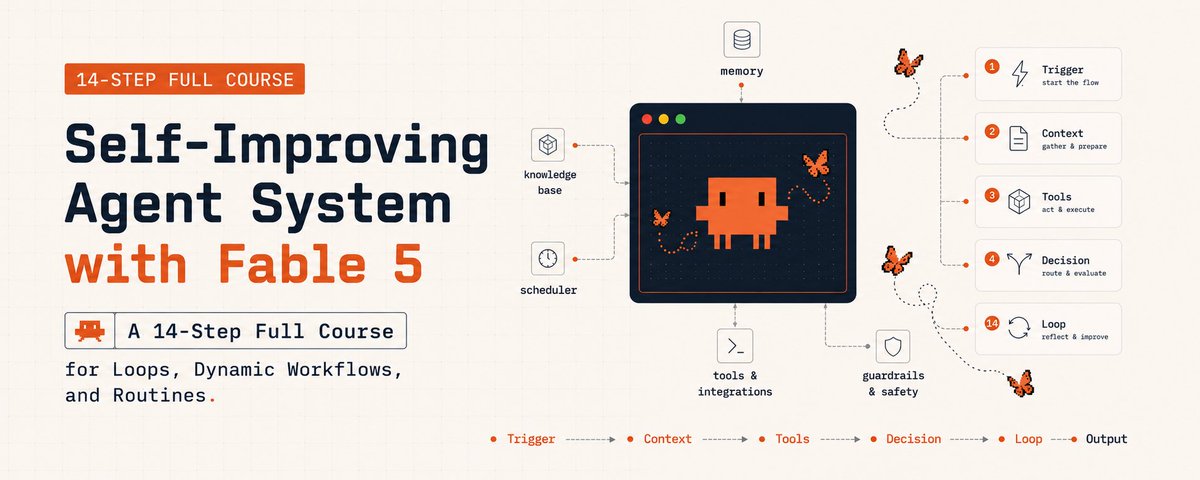
Build self-improving agent system with Fable 5 in 14 steps : loops, dynamic workflows, routines
every friend group got that one homie that lost his way and is a shell of his former self
Agent harnesses aren't the black magic many of y'all seem to think they are. To prove it, I built one.
People of. pi has supported OpenAI WebSockets mode since February. However, we did not support delta updates. pi v0.71.1 now also supports delta updates: only the latest context additions get send, leading to a nice 66% throughput increase. Start pi, /settings -> transport -> websocket-cached Here's SSE vs. cached WebSocket side by side. This will also apply to your OpenClaw instance, should @steipete & team decide to update to the latest and greatest, giving you all the benefits of the pi runtime on top of the Codex server backend.
Probably nothing 👀
AI Edge
If I Wanted to Get Rich with AI in 2026, I'd Do This