
How I Run the Pi Coding Agent on Cloudflare

I recently came across a tweet about Pi's programmatic APIs. I knew Pi as a coding agent, but its portable internals caught my attention. The agent loop, model providers, and session storage are available through lower-level packages rather than being tied to its terminal interface. This project uses @earendil-works/pi-agent-core and @earendil-works/pi-ai directly instead of embedding the full @earendil-works/pi-coding-agent SDK.
That made me think: can I run Pi entirely on Cloudflare's Developer Platform?
Most coding agents assume they are running on a developer's machine. They expect a persistent local filesystem, a shell, long-lived processes, and somewhere to store conversation history. Cloudflare Workers provides a very different runtime. There is no machine waiting for the agent. Workers has a request-scoped virtual filesystem, but it does not persist files across requests or provide the host filesystem a local coding agent expects.
This sounded like a fun challenge. Instead of making Workers behave like a laptop, I wanted to find the Cloudflare primitive for each capability Pi needed.
Pi on Cloudflare is what came out of that experiment. It is a browser-based coding agent where each session has durable conversation history, an isolated filesystem, streaming model output, searchable prior sessions, generated application previews, and one-click deployment to Cloudflare Workers.
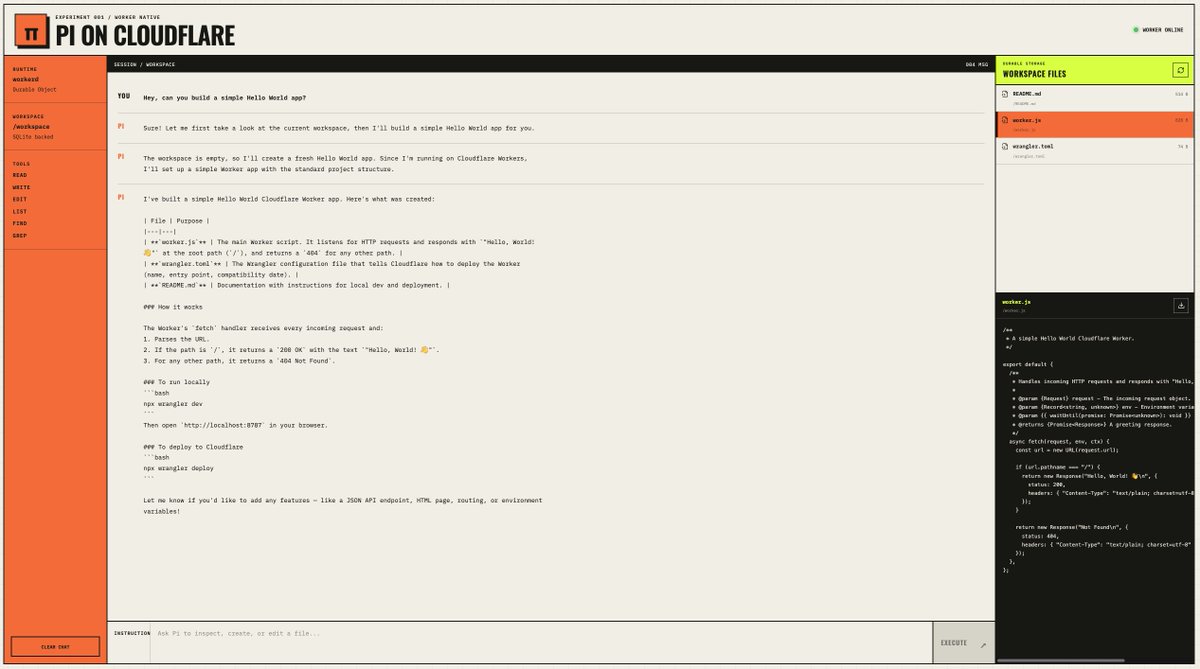
It is still a single-user prototype, not a production multi-tenant service. However, building it taught me a lot about what a coding agent needs from its runtime. Let me walk you through the design decisions, the Cloudflare primitives I used, and the limitations I accepted.
What I Wanted to Preserve from Pi
Pi is more than a chat interface around an LLM. Its core packages provide the parts required to run a coding agent:
The storage interface in pi-agent-core was the part that made this experiment possible. It doesn't require the transcript to live in a local JSON file. I could provide my own implementation while retaining Pi's native entry types and tree structure.
I didn't want to flatten Pi into another chat application with a list of messages. I wanted to keep its branches, compaction, tool loop, and model abstraction, then replace only the things that normally come from a local machine.
The Cloudflare version currently supports:
Pi on Cloudflare isn't a browser port of Pi's terminal interface. It is a new host for Pi's portable core.
The Architecture
I started by listing the capabilities that a local runtime normally gives Pi: identity for each session, durable state, files, model access, real-time communication, a way to execute generated code, and a place to keep deployed source.
Once I mapped those capabilities to Cloudflare products, the architecture looked like this:
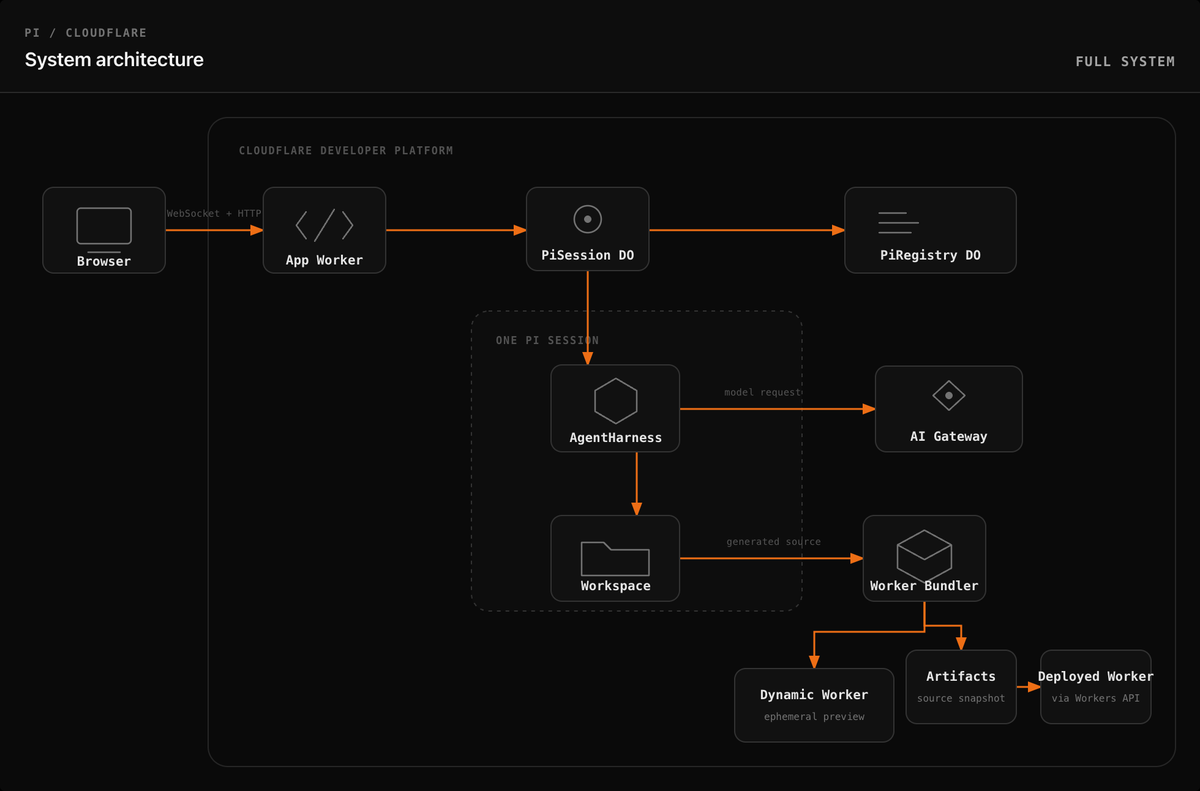
There are 2 Durable Object classes:
The application itself is a TanStack Start application deployed on Cloudflare Worker. The browser connects to the Durable Objects through the Cloudflare Agents SDK. Model requests go through AI Gateway. Generated applications run in Dynamic Workers during preview and become independent Workers when deployed.
One Durable Object per Pi Session
The first question I had to answer was: what owns a Pi session when there is no long-lived local process?
This is where Durable Objects clicked for me. I assigned one PiSession Durable Object to each conversation.
A coding-agent session is a natural coordination boundary. It has one active transcript, one selected branch, one workspace, and at most one model turn changing those resources at a time.
Each PiSession owns:
The code for this mapping is surprisingly small:
The Agents SDK Agent class extends Durable Objects with WebSocket connections, RPC, and browser clients. Durable Objects provide the identity, coordination, and SQLite storage underneath.
This gives each session an independent address and storage boundary. A busy session doesn't need to coordinate transcript writes with every other session.
It also gives me a straightforward exclusivity rule. Before Pi starts a prompt, the session marks itself active. Concurrent operations that could change the same transcript or workspace are rejected until the turn finishes.
Durable Objects solved the ownership and coordination problem, but I still needed to fit Pi's storage model into the Durable Object. That led to the next decision.
Durable Objects are single-threaded, but requests can interleave while awaiting non-storage I/O such as model calls. The active flag provides application-level exclusivity across the complete agent turn, not only an individual storage statement.
Preserving Pi's Session Tree in SQLite
A conventional chat application often stores messages in a table and updates or deletes rows when users retry a prompt. Pi doesn't work that way.
Each session entry has an ID, a parent ID, a type, and a timestamp. Together, those entries form a tree. Changing the active branch doesn't delete another branch. In the low-level pi-agent-core session model used here, Pi appends a leaf-selection entry that points to the newly selected part of the tree.
I preserve that representation directly:
The serialized entry can be a message whose role is user, assistant, or tool result. Other entry types represent model, thinking-level, or active-tool changes, compaction, branch summaries, custom data, labels, session information, or leaf selection.
Flattening everything into chat messages would discard the exact semantics I wanted to preserve. Pi's branch navigation and compaction logic expect the original entry relationships.
Appending non-empty user or assistant text also creates an indexing event within the same synchronous SQLite transaction. Every entry creates a separate event that updates the registry's session metadata. In simplified form:
There is a small but important failure case here. If I stored the transcript first and indexing failed afterwards, search could silently miss a completed message. If I indexed first, search could return a message that had never been committed to the session.
To avoid both cases, a background operation delivers the events to PiRegistry, but writing indexable transcript text and its outbox event happens atomically. Delivery can be asynchronous and idempotent because non-empty user or assistant text cannot be stored without also becoming eligible for indexing.
This is the transactional outbox pattern applied inside a Durable Object.
Giving Pi a Durable Filesystem
At this point, I had durable conversations, but that alone doesn't make a coding agent. Pi also needed files.
A Worker doesn't expose the host machine's persistent POSIX filesystem. This is where the experimental @cloudflare/shell package came in. It gave me a virtual filesystem backed by the session's Durable Object SQLite database.
Every Pi session therefore gets its own isolated workspace. Files survive Durable Object eviction because they live in durable storage rather than in the object's memory.
I expose 6 core filesystem tools to the model:
Each tool operates against the virtual workspace:
Write and edit tools run sequentially to prevent concurrent changes from racing against each other.
I also expose the workspace in the browser so I can inspect, refresh, and download files. I didn't want the filesystem to be an invisible implementation detail hidden behind the model.
The obvious next question is why I didn't give Pi a process sandbox. This version doesn't provide:
This is deliberate, and it is probably the biggest difference from running Pi locally.
The first version needed persistent source files and a way to run Workers applications. It didn't need a general-purpose Linux environment. Durable Object SQLite and Dynamic Workers cover that narrower requirement with fewer moving parts.
The system prompt makes that limitation explicit:
Here, "no POSIX filesystem" means the agent is not given a persistent POSIX workspace or a process environment. I don't expose Workers' request-scoped node:fs filesystem as an agent tool.
If I wanted the agent to compile arbitrary native projects or run existing CLI tools, I would use Cloudflare Containers or the process-oriented Cloudflare Sandbox SDK. For React and Workers applications built from a controlled template, the Worker-native path is enough.
Running Pi's Model Loop Through AI Gateway
With sessions and files in place, the next piece was model inference. Pi already separates the agent loop from its model provider, so I registered a custom provider backed by AI Gateway's OpenAI-compatible API.
The contextWindow and maxTokens values above are conservative budgets configured in this adapter, not advertised model limits. The currently selected GLM-5.2 model has a documented 262,144-token context window on Workers AI.
The committed configuration currently selects a Workers AI model:
I liked this approach because AI Gateway gives the agent one model endpoint while the model remains a configuration choice. It also gives me a natural place to attach request metadata:
The session ID makes model traffic attributable to the Pi session that produced it. Memory extraction requests include an additional purpose field.
The UI doesn't currently expose model or reasoning-level selection. The agent uses a fixed medium thinking level and server-side model configuration.
Getting the Stream Back to the Browser
The agent loop was now running inside a Durable Object, but a coding agent doesn't feel useful if the browser waits for the entire turn to finish. I wanted to show text, reasoning, and tool activity as Pi produced them.
The application routes /api/agents/* through the Agents SDK before passing other requests to TanStack Start:
Ordinary session operations use callable RPC methods. Prompts use a streaming callable method:
A prompt moves through the system as follows:
The client batches incoming deltas once per animation frame. Model streams can produce updates faster than React should render them, so batching reduces unnecessary UI work without changing what the user sees.
There is a catch. Only completed Pi entries are durable. Partial token deltas and the browser's position within an active stream are not. If the Durable Object restarts during a turn, the client can reload completed durable entries but cannot reattach to the interrupted stream. Resumable active turns are something I still want to explore.
Searching Across Sessions
One Durable Object per session worked well until I needed to answer questions across them. How do I list every session, search old conversations, or carry a useful preference from one session into another?
This is why I added a singleton PiRegistry Durable Object.
The registry handles:
The registry indexes non-empty user and assistant text with SQLite FTS5. It intentionally excludes reasoning, tool output, compaction summaries, and workspace files.
I deliberately kept the search lexical rather than adding embeddings and a vector database. SQLite FTS5 has lower operational complexity and produces predictable results for session names, phrases, and code fragments. The agent can call a session_search tool to retrieve relevant text from earlier sessions.
Deletion tombstones handle an important race. Index events travel asynchronously from a session to the registry. Without a tombstone, a delayed event could recreate metadata for a deleted session. The registry records the deletion and rejects later events for that session.
Learned Memory
The registry also stores global memories classified as:
Memory can change through an explicit model tool or through background extraction after completed turns. The extraction prompt treats transcript contents as untrusted data and requires every change to cite a user-authored source entry.
Later sessions receive those memories in their system prompt.
Memory can become dangerous quickly if an agent stores everything it sees. I therefore kept this feature conservative. It limits the number and total size of memories, uses optimistic version checks for background extraction updates and deletions, and rejects selected secret patterns. Explicit updates through the memory tool do not currently use the same version check. Those checks are guardrails, not a complete data-loss-prevention system.
Memory is currently global to the deployment. It isn't separated by user because the application doesn't yet have a user identity model.
Building an App Without a Build Process
This was the part I was most curious about. Writing source files in SQLite is useful, but I wanted Pi to build something I could actually open and deploy. How do you build a React application when you cannot spawn Vite as a process?
When the user asks Pi to build an application, the model calls initialize_app. That tool copies a React template pinned to a full Git commit into the durable workspace.
Pinning the commit gives the agent a known project shape:
When the user requests a preview or deployment, the application creates a deterministic source snapshot. It excludes directories such as .git, node_modules, dist, and .wrangler, then enforces explicit limits:
The snapshot is sorted and hashed. The source hash lets the UI detect changes and lets the session reuse a matching in-memory build.
Instead of starting a process, I call the experimental, Workers-runtime-only @cloudflare/worker-bundler package directly inside the Worker:
The catch is that this is not equivalent to spawning vite build. The hosted builder uses a controlled entrypoint, fixed compatibility settings, and an in-memory source map. It doesn't execute arbitrary package scripts or custom Vite plugins.
That constraint makes builds repeatable and keeps generated code inside the runtime model I designed for.
Previewing Generated Code with Dynamic Workers
A successful build left me with another interesting problem: the generated code didn't exist when I deployed the host Worker, but I still needed to execute it for a preview. Dynamic Workers is currently in open beta.
The Worker Loader binding lets the application create a Dynamic Worker from the generated modules. I use the bundle hash as its ID:
Using get() instead of loading a new Worker for every request lets the runtime reuse a warm isolate when available. Reuse is not guaranteed, and the callback may run again if the runtime needs a new isolate.
The preview Worker receives these application-configured limits and bindings:
The wrapper serves static files first, delegates API requests to the generated Worker, and falls back to index.html for client-side routes.
This is isolated Worker execution, not a Linux process sandbox. Generated code can handle requests using Workers APIs, but it can't spawn a process or access the Pi session's Durable Object unless I explicitly provide a binding. Because the current loader configuration does not set globalOutbound: null, generated code can still make outbound requests with fetch() or connect().
For this project, the binding isolation is useful: the generated app receives no session storage or secrets. Outbound access remains a capability I would need to restrict before treating previews as untrusted code.
Versioning and Deploying Generated Applications
Once preview worked, I wanted a path from "the agent built this" to "this is a real deployed application." A preview is temporary. A deployed application needs durable source history and an independent Worker.
The deployment pipeline has 2 destinations:
Artifacts provides Git-compatible, versioned storage. I create one repository per Pi session and publish the exact source snapshot used for the deployment.
The application uses a short-lived repository token and a JavaScript Git client over the virtual workspace. This gives each deployment a source commit without requiring a native git process.
After publishing the source, the deployment client:
Each generated application becomes its own Worker. It doesn't keep running inside the original Pi session after deployment.
Deleting a session also deletes its generated Worker and Artifacts repository when deployment metadata exists.
Why Each Cloudflare Primitive Is Here
By this point, every primitive had a specific job. I didn't want to add a product because it might be useful later. I added it only when the implementation had a concrete requirement.
I didn't add KV, R2, D1, Queues, Workflows, Containers, or Vectorize. None of them solved a requirement that the existing primitives couldn't already cover.
Current Trade-offs
I am happy with how much of Pi works on Cloudflare, but I don't want to present this as a production-ready replacement for a local coding agent. The architecture works because it chooses a narrower definition of a coding environment.
The main limitations, in order of importance, are:
The first point is the most important.
This repository is a single-user prototype. Session UUIDs create storage boundaries, but they are not authorization controls. Anyone who can reach the deployment can potentially inspect sessions, modify files, call the model, influence global memory, or deploy applications using server-side credentials.
Important: Protect the entire Worker with Cloudflare Access or another authentication layer before exposing it to the Internet. When using Access, follow Cloudflare's guidance to validate the Access JWT in the Worker as well.
Run Pi on Cloudflare
If you want to try the same setup, here is the shortest path. Remember that the project has no application-level authentication, so protect a deployed instance before giving it privileged credentials.
The committed GLM-5.2 configuration requires the Workers Paid plan. Generated app deployment also requires enrollment in the Artifacts beta and an Artifacts namespace named pi-apps, which you can create in the Cloudflare dashboard.
Clone the repository and install its dependencies:
Because the project uses a remote Artifacts binding during local development, authenticate Wrangler first:
Create a local environment file, then add your Cloudflare account ID and an API token with AI Gateway - Read, AI Gateway - Edit, and Workers AI - Read permissions:
Start the local Worker runtime:
For a production deployment, including generated app deployment, configure these Worker secrets. Use the AI Gateway token described above for CLOUDFLARE_API_TOKEN. WORKERS_DEPLOY_API_TOKEN needs account-scoped Workers Scripts Read and Workers Scripts Edit permissions so the application can create and delete Workers, upload assets, create versions and deployments, and read the account's workers.dev subdomain.
Deploy the host application with:
The repository includes UI tests running in jsdom and a separate test suite running inside the Workers runtime:
What I Learned
I started with a simple question after seeing a tweet: can Pi run on Cloudflare?
What I learned is that Pi's lower-level agent, provider, and session abstractions didn't need its normal terminal host. They needed a set of capabilities around them: durable identity, coordinated state, files, model access, streaming, and a constrained way to execute generated code. Pi's portability let me keep the difficult parts of the agent, including its tool loop, session tree, model abstraction, streaming events, and compaction behaviour.
Cloudflare supplied the runtime around it:
The project doesn't imitate a local machine. It treats Workers as the target environment from the beginning. That forced me to be explicit about what the agent can do, and equally explicit about what it cannot do.
I also have a new appreciation for Pi's design. Making the agent loop and session storage portable is what made this entire experiment possible.
The project is open source. If you are experimenting with coding agents on Cloudflare, take a look and let me know what you build. I am especially interested in how you would approach resumable turns, historical workspace snapshots, or multi-user isolation.
I also recommend looking at Project Think. It is an opinionated harness from Cloudflare whose design is inspired by Pi. It packages Cloudflare-native capabilities including workspace tools, persistence, stream resumption, durable recovery, extensions, and sub-agent support, so less custom infrastructure is required. I personally am building Yukt, using Think.
If you have questions or feedback, feel free to reach out on LinkedIn or X.