

How to Automate Your Life With Claude (Full System)

I've officially cloned myself with Claude.
This isn't another generic AI second-brain article; what I'm about to reveal is the exact system I've used to automate 80%+ of my life using AI.
Every process and task that used to live in my head - how I script a video, how I find outlier content, how I close deals - is now completely automated by AI agents.
I've even built a mindmap visual system that allows me to view and tap into all of my business automations at any time - which I'll teach you how to build as well.

This is the most important AI automation article I've ever written.
Table of Contents
I: Where Second Brain Systems Fail
II: Workflow Audit
III: Designing Specs & Skills
IV: Folder & Visual Map
V: Deploying Your Workflows
Let's get right into things:
I: Where Second Brain Systems Fail
Before we dive into building automations, I want to provide a bit of context as to why I built this system in the first place.
If you're like me, you've probably tried Notion, Obsidian, and other related AI second-brain tools.
The problem isn't that these tools don't work; they do, and I've made plenty of content outlining how I use them.
However, the problem I kept running into when using tools like Obsidian is the constant manual upkeep they need to stay useful.
The moment you stop adding notes to your vault, Obsidian becomes useless.
The moment you stop updating CRMs and databases, Notion becomes useless.
And as someone who is quite busy, I frankly don't have the time to maintain AI systems, CRMs, and databases.
So, I bit the bullet and spent weeks building a system that evolves itself as I work, carries context permanently, and holds my actual step-by-step processes rather than just storing notes about them.
If you're running into the same bottleneck when trying to automate your life with AI, I really think you'll find this article useful, and I'm excited to share my new system with you.
II: Workflow Audit
You can't automate what you haven't identified. So before anything else, we need to list out what you actually do.
The audit itself is simple: Let AI interview you about every recurring task in your life or business, then rank them by what's worth automating first. The highest priority tasks are the ones we'll build agents/automations around, so we want to be precise here.
Starting with a profile
The best way to get started is to create a "profile" of you so Claude has full context before we start automating things.
This Claude audit prompt will conduct an in-depth interview of all your daily tasks and workflows:
Claude's output from the above prompt (example):
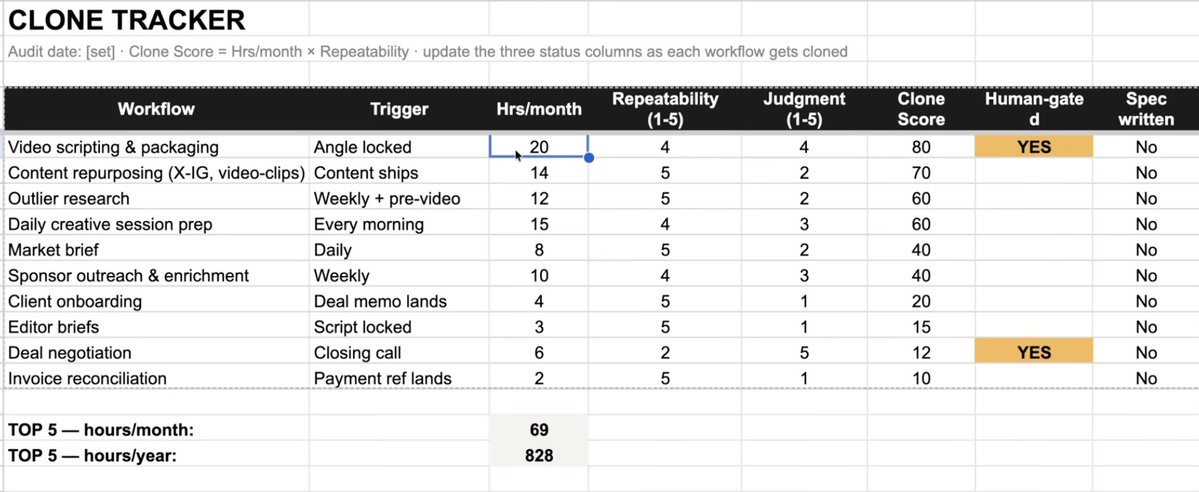
You won't identify every task you do in one session. That's fine. We're just trying to build a base here, and you can add to it over time.
Clone Score
Once you've listed all your daily tasks, Claude will rank them using a "Clone Score." The logic is straightforward. The more time something eats and the more repeatable it is, the higher the priority it becomes for automation in the later steps.

Real Example
I don't just want to talk theory here; I want to give you guys a real, practical example using my sponsorship pipeline.

One of the things my team and I spend a lot of time on is signing deals and sponsors for my brand.
On the surface, "landing a deal" feels like one thing, but in reality it's seven separate processes (shown above), and only some of them can be automated.
For example, researching and finding contact info can absolutely be automated, but final negotiation and content delivery can't.
By conducting a workflow audit using the prompt above, you can identify not only your daily workflows but also the exact steps within them that can and should be automated.
That's the entire point of this step.
III: Designing Specs & Skills
Once you've identified a few things worth automating, the next step is to break down your workflows into specs and skills that agents can actually run.
There are two ways to design and create automation skills within Claude:
If you can explain the workflow process out loud, this is the fastest route.
Open Claude, use the skill creator, and walk it through whichever workflow you want to begin automating.
I personally use Whispr Flow to transcribe rather than typing, because you explain things more naturally when you're speaking.
Spec prompt to get you started:
2. Teach Claude a Skill
Your second option is to record your workflow and use the teach-claude-a-skill feature to automatically build a reusable Claude skill around it.
To get started with this feature, open Claude desktop and hit "Record a skill."

I've been toying around with this new feature quite a bit, and one of the things I really like is that Claude can actually hear you, so while you're doing a workflow, you can actually explain the entire process.
For example, if you're creating a workflow around how you write tweets, you can actually sit down, write a tweet, and explain your entire thought process to Claude. Claude then internalises all that information and creates a reusable skill from it.
This legit feels like training an employee on exactly how you'd do a task.
By the end of this step, the goal is to have at least a few reusable skills that you're satisfied with.
IV: Folder & Visual Map
Ok, so you've got your automation specs/skills. Now they need a place to live and a way for you to actually oversee all your workflows.
Folder Design
Ask Claude to build you a structured business folder, or make one yourself.
Mine has two parts:
Stores all my meetings, finances, etc. - you can add whatever you want your AI agents to know here.

2. Specs
A place to store all your specs/skills/SOPs created in the last step.

Here's where things really get useful for you.
An agent might read your markdown spec files perfectly fine, but you probably don't.
As humans, we like to see visuals, and when you're running so many skills/workflows, it can be hard to keep track of everything. So, I created a visual mind map of all my workflows (as shown previously with my sponsorship pipeline).
Building visuals
Example workflow map output
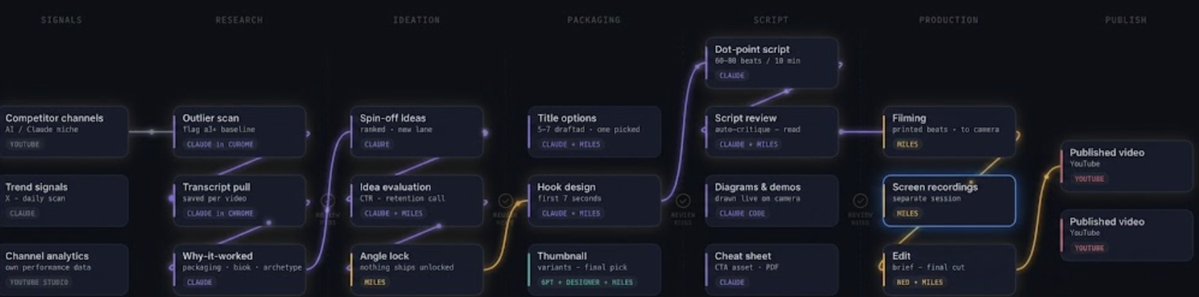
This map visualisation process might seem silly, but it's actually extremely helpful.
It's then up to you whether you store these HTMLs locally or deploy them on a hosting tool like Vercel.
V: Deploying Your Workflows
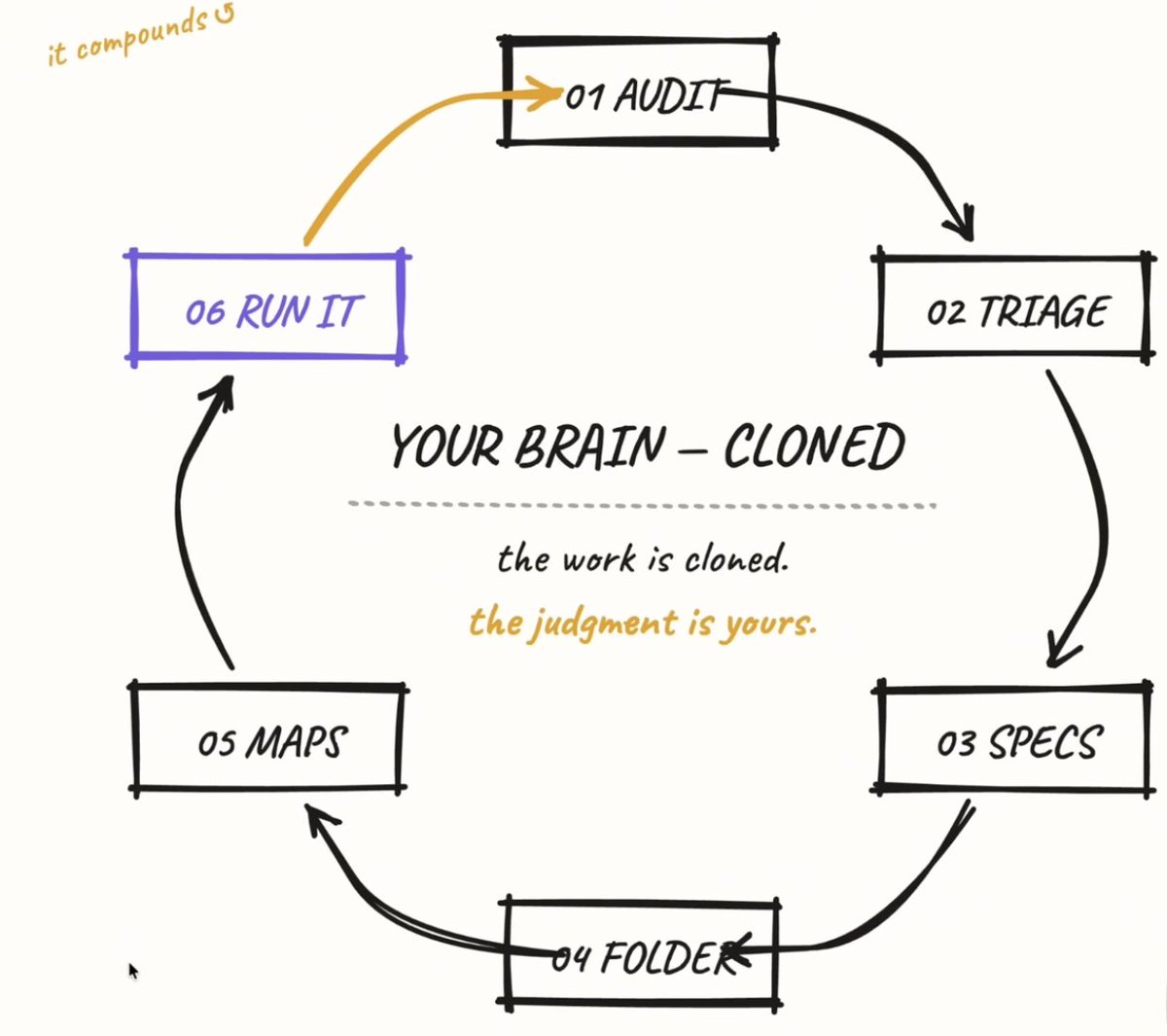
So to recap so far:
2. You designed skills and specs that replicate those tasks
3. You created a folder and visual map system for easy management
Now, the last step is to actually deploy your workflows and agents.
The good news is, this is actually the easy part, and you have a lot of options:
The possibilities for how you choose to deploy your workflows are endless, and there is nothing wrong with using a combination of all the options above.
Final Thoughts
I think this is the single most important thing you can do for your business and personal productivity right now.
Final advice: start with just a few workflows and add to things over time. There's no need to overwhelm yourself with automating dozens of things at once. Just focus on the highest-leverage daily tasks first.
I hope you've found this article helpful.
If you did, follow me here @milesdeutscher - I post articles every week covering how I actually use AI in my personal life and business.
For deeper AI insights, follow me over on @aiedge_.
If you enjoy AI content in a written format, feel free to subscribe to my free AI newsletter.
Every Wednesday, my team and I send a publication with AI workflows, tips, research & more.
https://newsletter.aiedgehq.co/

100% free, no spam ever & unsub anytime
Thank you for making it this far.
-Miles💙